Before you buy an MX Keypad or MX Creative Console, read the comments
Logitech’s MX Keypad and the larger MX Creative Console are hardware you buy for one job. We watched seven popular reviews and read all 204 comments under them. The reviews are mostly glowing. The comments are where owners say what living with it is like. Here is what they love, what they send it back for, and what the iPad or iPhone already on your desk can do for your Mac instead.
By the iMacroPad team · · 8 min read
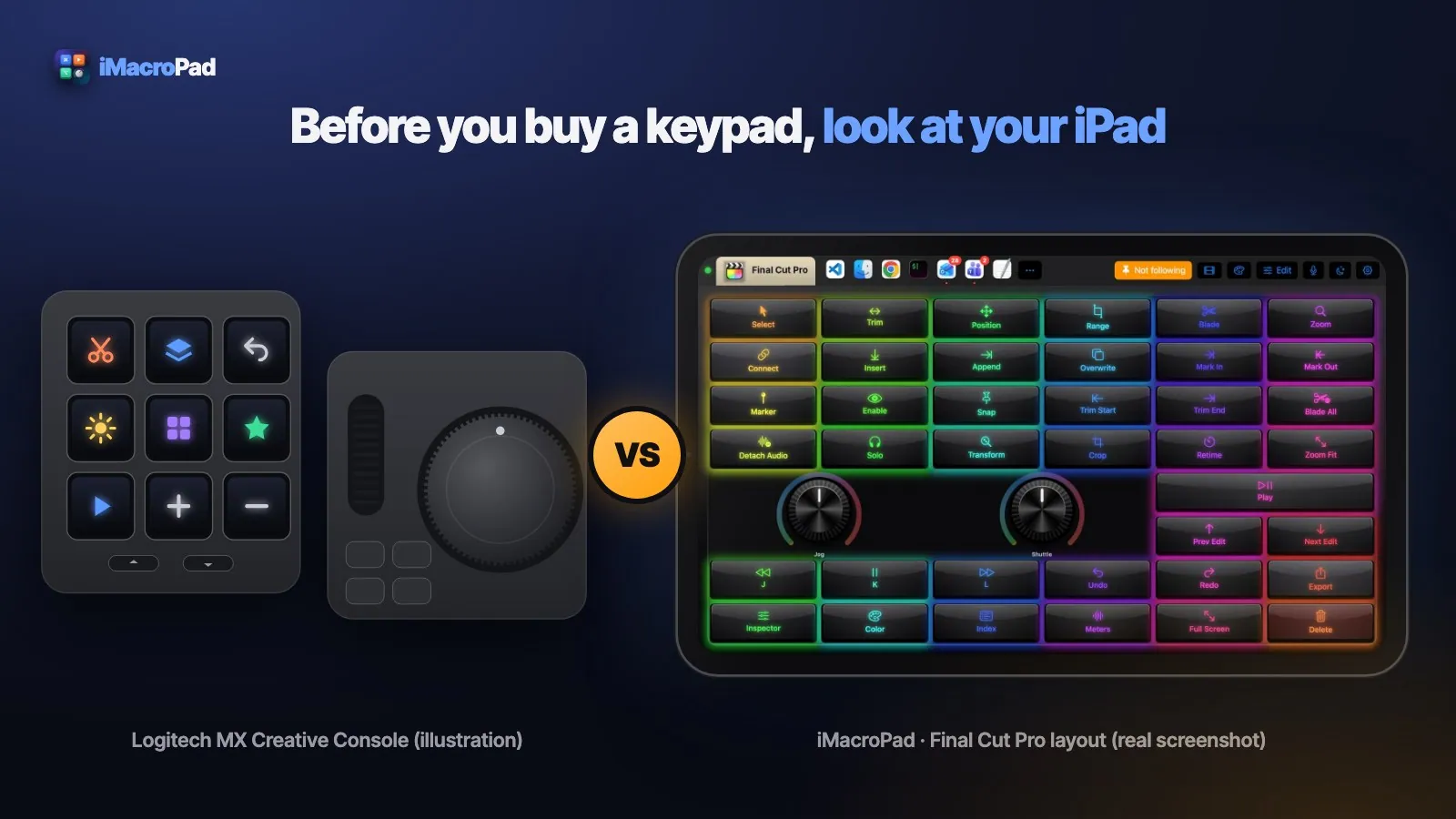
How we did this
We picked seven popular English reviews from the last two years: four on the MX Creative Console for Premiere Pro, Lightroom and Final Cut Pro, one comparison with TourBox, and two on the newer MX Keypad for coding and AI workflows. We read the transcripts and every public comment, then grouped the comments by what they were about.
One thing stood out before we even started: five of the seven say they partnered with Logitech or link to the product through Logitech’s partner links. Commenters noticed too. The most-liked comment under one review reads: Kind of bummed that 99% of reviews for products like this are freebies, and the reviewer is almost always using some Adobe product.
We make a competing app, so read this with that in mind. That is also why there is a section below on where Logitech’s hardware wins.
What owners love
- Keys that change with the app. Every review shows the same moment: switch from Premiere Pro to Photoshop and the keys change with it. It is the feature people praise most.
- The dial and the Action Ring. Hover over Exposure in an on-screen ring and turn the dial. As one reviewer put it, nudging a slider with a mouse is so fiddly that he used to type the number in by hand.
- Labels on the keys. A reviewer who moved from an unlabeled mechanical pad said he was tired of remembering what each key did.
- Awkward shortcuts on one key. Things like ⌥⇧⌘S for audio lanes in Final Cut Pro, commands with no shortcut at all, a folder you open twenty times a day.
- One button for a whole AI task. The MX Keypad reviews put Claude Code behind a key: make an invoice, build a media kit, update the README and push.
That is a good list. Every item on it is about software, though: the app switching, the labels, the ring, the scripts. The hardware is a way to reach them.
What owners complain about
| Complaint | Comments | In their words |
|---|---|---|
| “Will it work with my app?” | about 48 | Can you use it to control any app? Or just the built in ones? I want to use it for Ableton |
| Looking at alternatives | about 25 | Stream Deck, TourBox, Touch Portal on a spare tablet, MIDI controllers |
| AAA batteries, wired keypad, two pieces | about 20 | It’s 2026, why doesn’t it have a USB-C charge? |
| Loupedeck being wound down | about 19 | Logitech killed Loupedeck for this… unbelievable |
| Unstable software | about 14 | I returned mine… I found the software awkward and buggy(the most-liked comment under that review) |
| Price | about 11 | For the price, it should be rechargeable. |
| “Share your setup” | about 9 | Can you share your Final Cut customization layout file?(the most-liked comment under that review) |
| Nine keys behind pages | about 8 | With only 9 dynamic buttons, you now have to remember the button menu hierarchy |
The reviewers raised some of these too. One gave the software 8.5 out of 10 and the hardware 5 or 6, called the stand flimsy, and said that if you don’t use Adobe apps, it may not be the time to buy yet. A wedding photographer who paid for his own unit said the dial has no steps, so moving one photo sometimes moves two, and he chose a TourBox instead.
What your iPad already does
iMacroPad turns an iPad or iPhone into a macro pad for your Mac. Here is how it answers each of those comments, and where it can’t.
“Will it work with my app?” Probably already does
The question that came up most has the shortest answer. iMacroPad comes with 81 ready layouts, including DaVinci Resolve, Final Cut Pro, Logic Pro, Lightroom, Photoshop, Figma, OBS Studio, Microsoft Teams, Excel, Zoom, Slack, Xcode, VS Code, Blender and Claude Code. Bring the app to the front on the Mac and its layout appears on the pad.
For anything else, a key doesn’t need a plugin from the app’s maker. It can press any menu item by name in any Mac app, even a command that has no keyboard shortcut, or send any shortcut, open an app, a folder or a web page, type text, or run a macro or an Apple Shortcut.
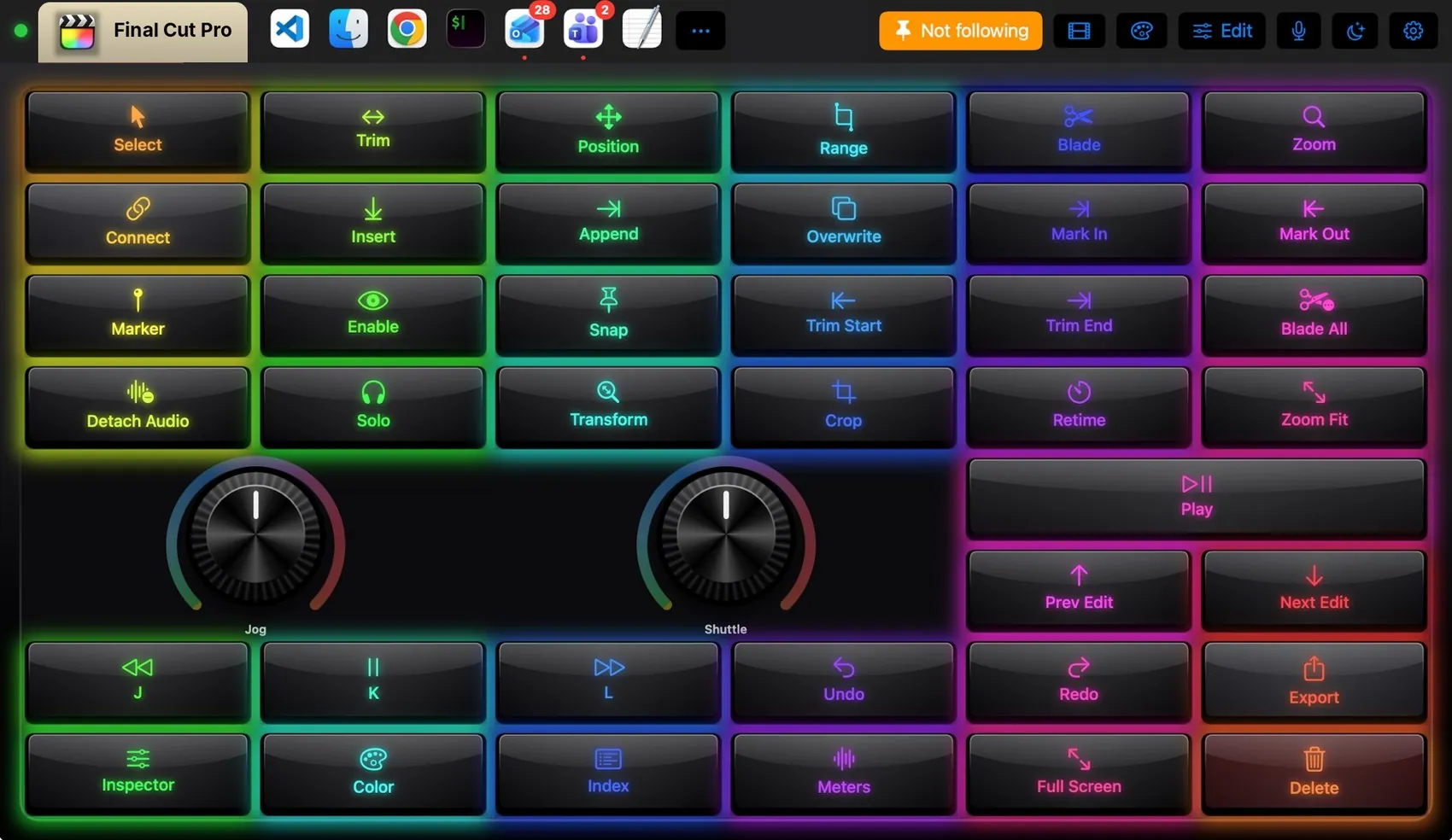
Nine keys and a dial, or the controls the app needs
Each layout is a 6 × 8 canvas, not a fixed grid. Put down keys, knobs, faders, a trackpad, a trackball, scroll wheels, piano keys or a color wheel, at any size. Final Cut Pro gets 39 keys plus jog and shuttle knobs on one screen, with no pages to flip. OBS gets a fader per audio input. Excel gets a numpad. Tap Edit, drag to move, pinch to resize.
The knobs turn in steps: one step, one command. One frame is one frame, and one photo is one photo.
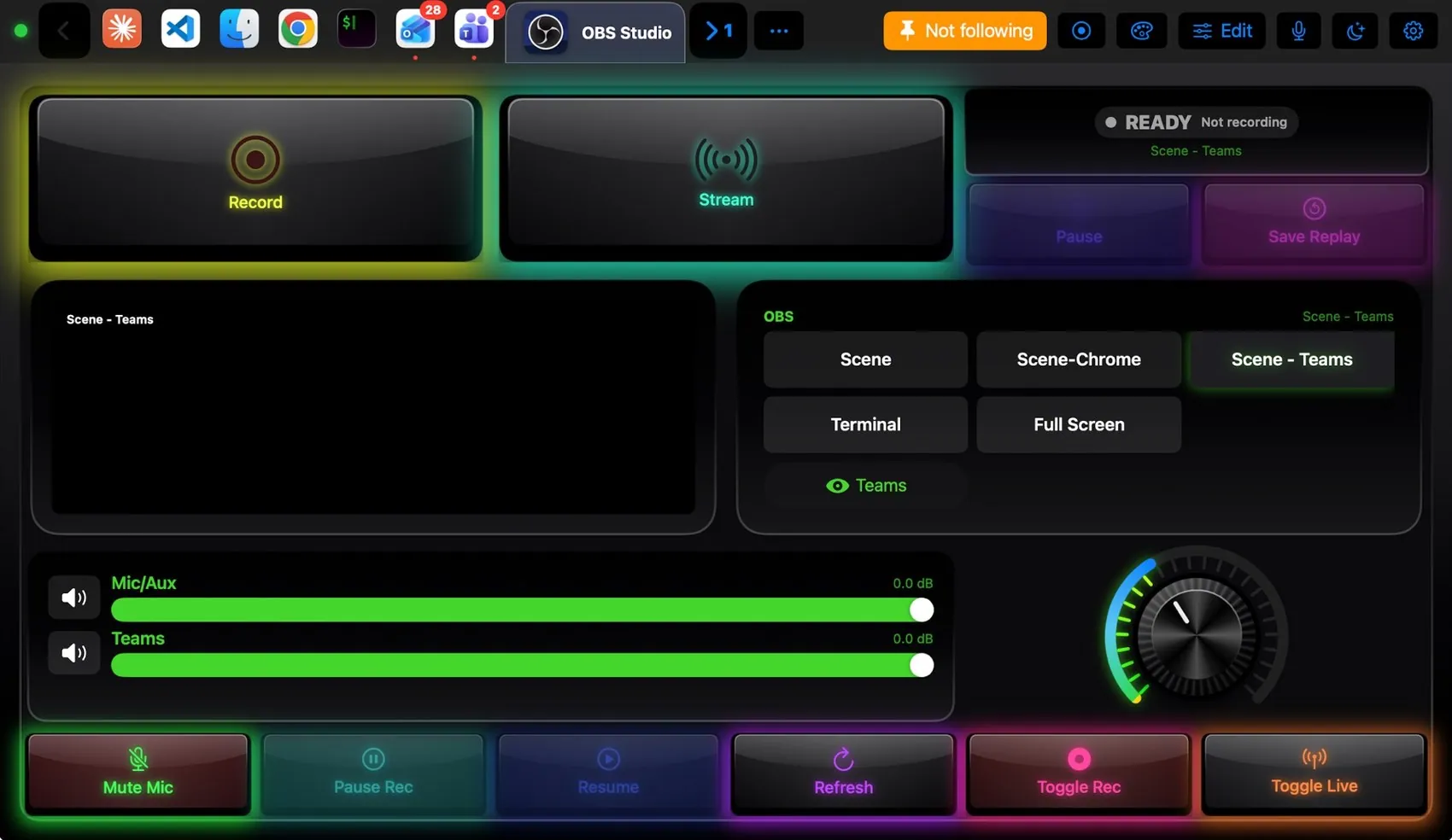
No batteries, no cable, no second box
The MX Creative Console is two pieces: a wired keypad and a dialpad that runs on two AAA batteries. Your iPad is already charged, already on the desk and already wireless. When you need the iPad back, it is still an iPad.
Keys that show what is going on
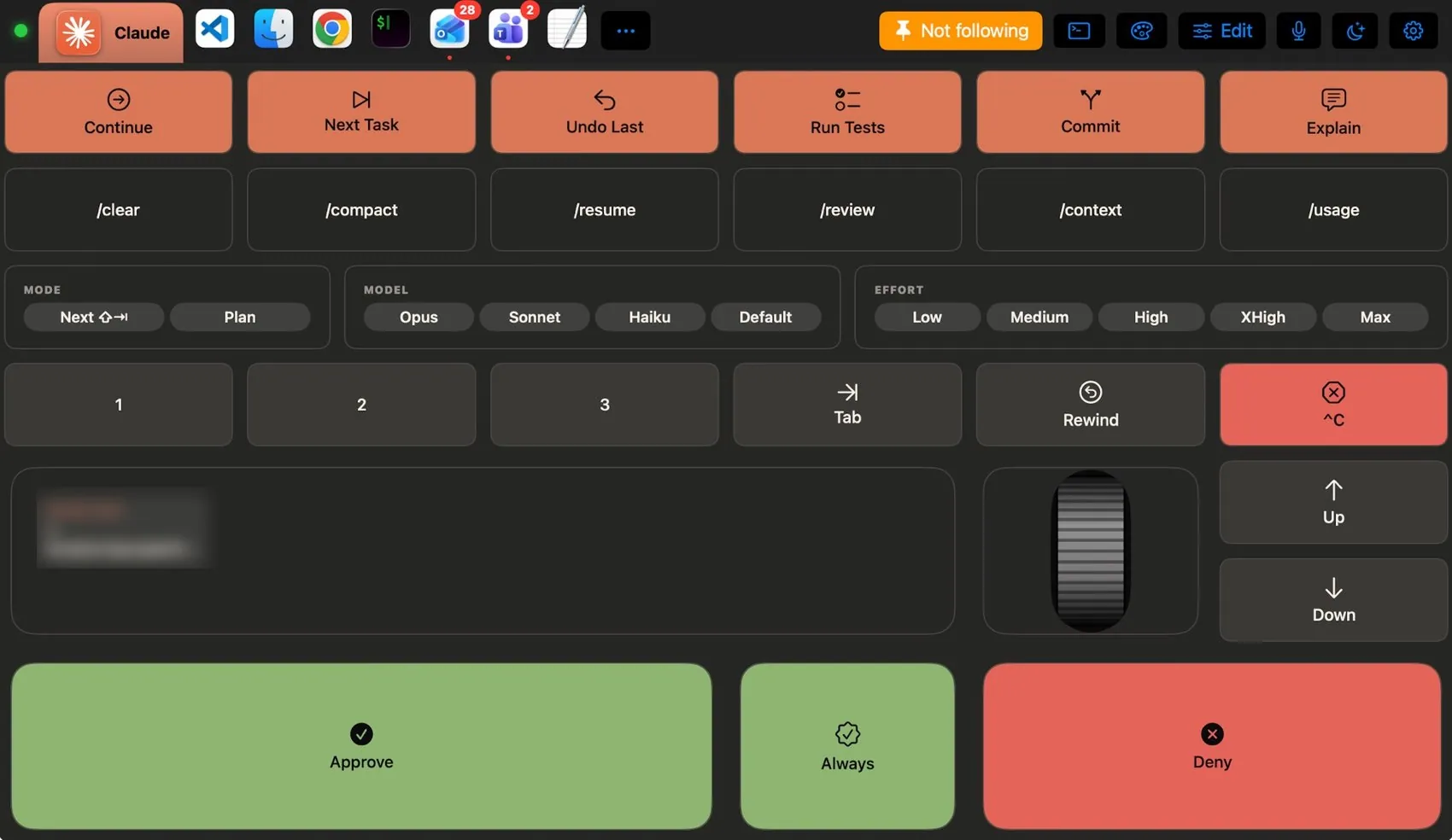
Every key shows its own label and icon, and where the app reports it, the real state: Record lit only while OBS is really recording, Teams’ mic, the Mac’s volume. The Claude Code layout appears when Claude Code runs in your terminal, with keys to approve, deny, send the next task or dictate one.
Share a setup with one tap
The most-liked comment under the Final Cut Pro review asked for the reviewer’s layout file. iMacroPad has a public community catalog of shared setups, each reviewed before it goes up, and installed with one tap.
Free to find out
iMacroPad is free with every feature. After a few weeks the free version shows an ad beside the pad. iMacroPad Pro removes ads for good on four devices with one purchase and no subscription. If it doesn’t fit your workflow, you have lost an evening, not the price of new hardware.
Where the Logitech hardware wins
- Feel. A real dial with weight and real keys you can find without looking. iMacroPad has press animation and click sounds, and haptics on iPhone, but glass is still glass, and iPads have no vibration motor.
- Windows. The MX Creative Console works on Windows and Mac. iMacroPad controls a Mac only.
- Your iPad stays free. While iMacroPad runs, the iPad is a pad. If you use it as a second screen or a drawing tablet at the same time, a separate device makes sense.
- No network. USB and Bluetooth don’t depend on Wi‑Fi. iMacroPad talks to the Mac over your own network, so a guest network that keeps devices apart won’t work.
- Adobe plugins. Logitech’s Adobe integrations talk to Premiere Pro and Photoshop directly. If your work is mostly Adobe and you want a dial, the console was built for you.
So, which one?
Buy the MX Keypad or MX Creative Console if you work on Windows, or mainly in Adobe apps, and want real keys and a dial that never touch your iPad.
Try iMacroPad first if you’re on a Mac, have an iPad or iPhone, and use apps beyond Adobe: Final Cut Pro, DaVinci Resolve, Logic Pro, Figma, OBS, Excel, Claude Code. It costs nothing to try, and if you decide you want hardware afterwards, you will know exactly which keys you need.
FAQ
Is there an alternative to the Logitech MX Keypad for the Mac?
If you own an iPad or iPhone, iMacroPad does the same job in software: labeled keys that change with the app in front on the Mac, plus knobs, faders and a trackpad. It is free to start. If you want physical keys, a Stream Deck or the MX Keypad are the hardware choices.
Does iMacroPad work with DaVinci Resolve, Final Cut Pro and Logic Pro?
Yes. All three have built-in layouts, along with Lightroom, Photoshop, Figma, OBS, Teams, Excel, Xcode, VS Code and more. For other Mac apps, a key can press any menu item by name, so you don’t need to wait for a plugin.
Is iMacroPad a Loupedeck alternative?
For Mac users with an iPad, it covers much of the same ground: the Lightroom layout puts Develop tools, copy and paste settings, ratings and flags on keys, and you can add knobs and faders anywhere on the canvas. Your layouts live on your own devices, not on a vendor’s marketplace.
Does iMacroPad work on Windows?
No. iMacroPad controls a Mac with macOS 13 or later, from an iPad or iPhone with iOS 16 or later, on the same network. An Android version is coming to Google Play and also controls a Mac.
How much does iMacroPad cost?
Nothing, with every feature. After a few weeks the free version shows an ad beside the pad. iMacroPad Pro removes ads on up to four devices with one purchase, no subscription.
Sources: transcripts and public comments of seven YouTube reviews by Plaen Co., Edward Lee Films, The Art of Photography, Magic Wedding Photographer, ZY Cheng, Terren Rule and softwarewithnick, read on November 11, 2026. Comment counts are approximate, grouped by topic; one comment can count under more than one.