Made by the people who use it.
Layouts for apps we never thought of, widgets, themes, plugins that call other services, and macro workflows. Each one is checked before it is listed, and again by the app before it installs.
Editors’ picks
Chosen by the people who review every submission.
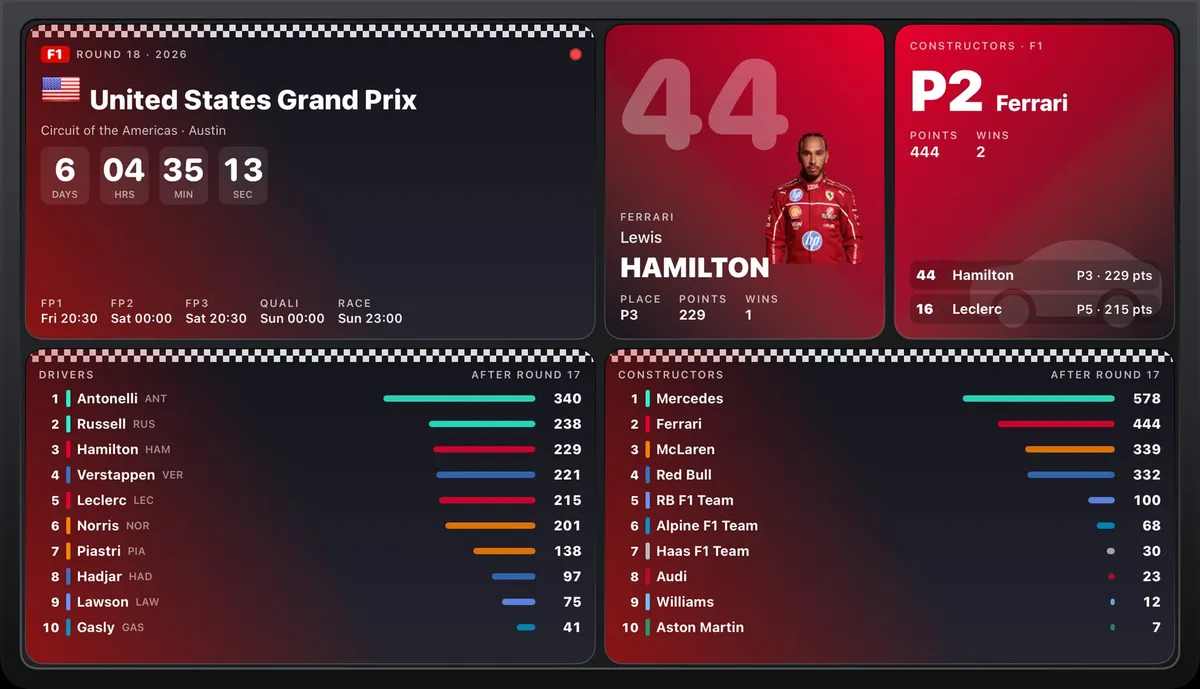 WidgetsSports scoresby iMacroPad communityYour teams in their own colours: team card, match countdown, scoreboard, full league tables (Europe, the US leagues, any country), player card, tennis rankings and Formula 1. Any sport and country: search, or browse sport ▸ country ▸ league. Five looks, six layouts. Data: TheSportsDB, ESPN, Jolpica.
⤓ 0♥ 0
WidgetsSports scoresby iMacroPad communityYour teams in their own colours: team card, match countdown, scoreboard, full league tables (Europe, the US leagues, any country), player card, tennis rankings and Formula 1. Any sport and country: search, or browse sport ▸ country ▸ league. Five looks, six layouts. Data: TheSportsDB, ESPN, Jolpica.
⤓ 0♥ 0
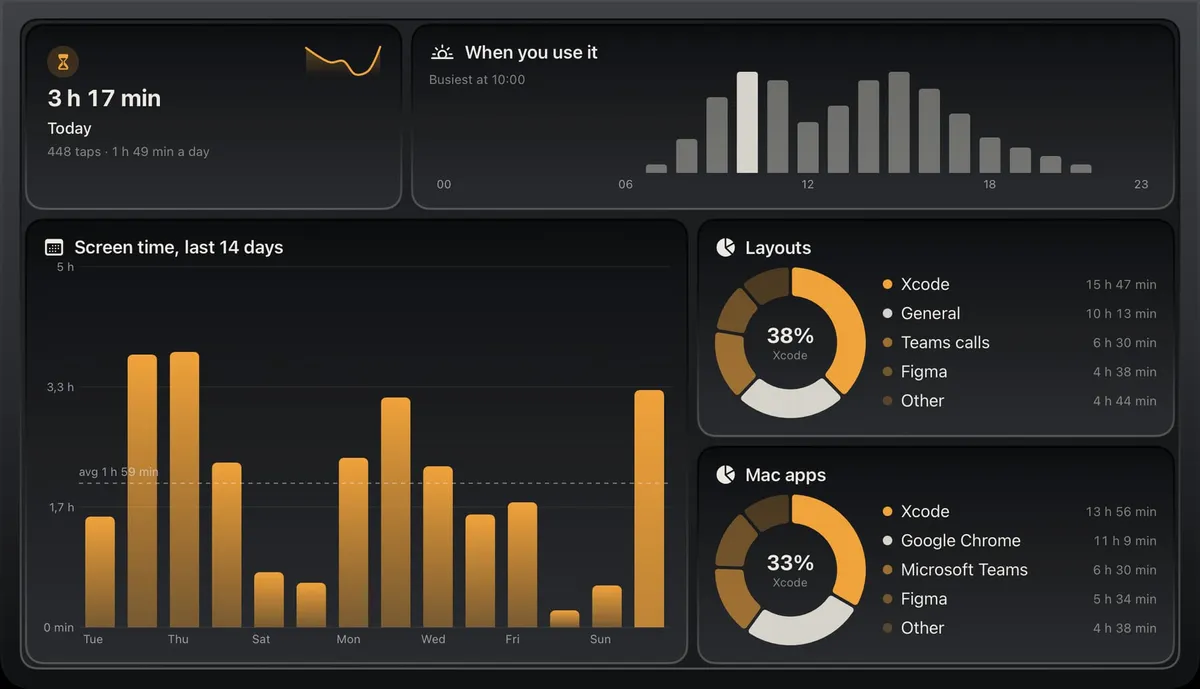 WidgetsUsage statsby iMacroPad communityYour own pad in numbers, drawn like Settings ▸ Stats and in your theme's colours: today's screen time with the week as a sparkline, the last 14 days, the layouts, Mac apps and themes you use most as rings, the hours you use it and the keys you press most. For any layout or the screensaver, with two ready layouts. Counted on this iPad; nothing leaves it.
⤓ 0♥ 0
WidgetsUsage statsby iMacroPad communityYour own pad in numbers, drawn like Settings ▸ Stats and in your theme's colours: today's screen time with the week as a sparkline, the last 14 days, the layouts, Mac apps and themes you use most as rings, the hours you use it and the keys you press most. For any layout or the screensaver, with two ready layouts. Counted on this iPad; nothing leaves it.
⤓ 0♥ 0New and updated
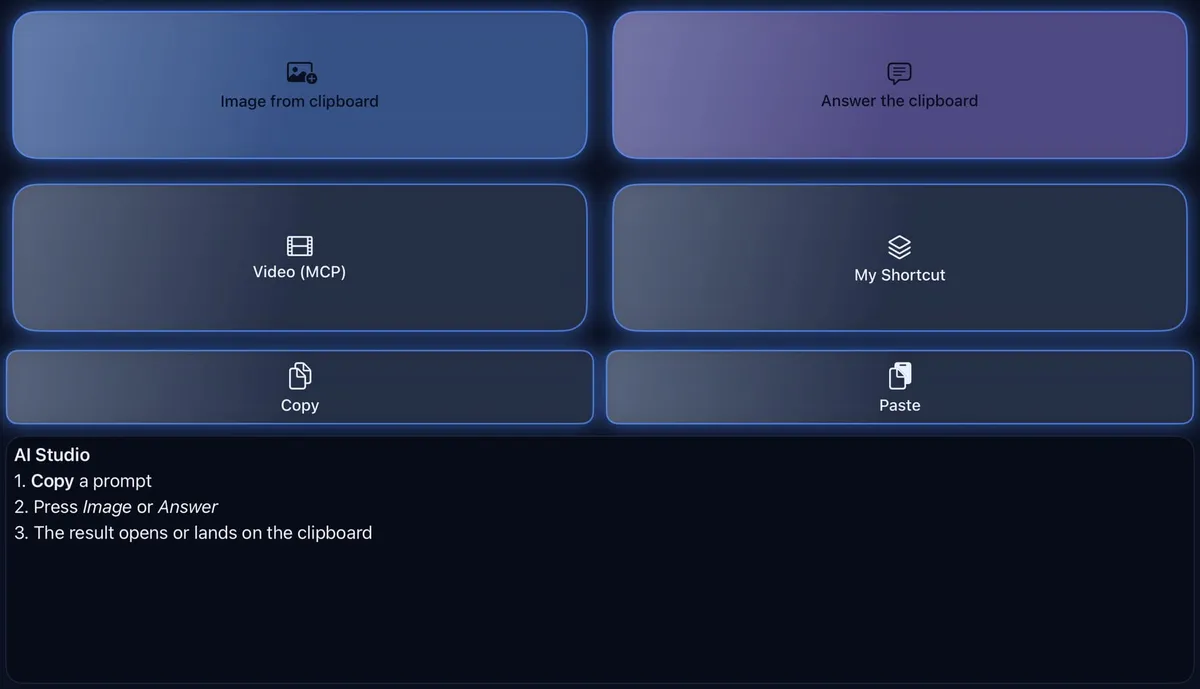 IntegrationAI Studioby iMacroPad communityKeys that call AI services: an image from the text on your clipboard (Gemini 2.5 Flash Image, “Nano Banana”), a short answer to it, a video through an MCP server, and one of your own Shortcuts.
⤓ 0♥ 0
WidgetsSports scoresby iMacroPad communityYour teams in their own colours: team card, match countdown, scoreboard, full league tables (Europe, the US leagues, any country), player card, tennis rankings and Formula 1. Any sport and country: search, or browse sport ▸ country ▸ league. Five looks, six layouts. Data: TheSportsDB, ESPN, Jolpica.
⤓ 0♥ 0
IntegrationAI Studioby iMacroPad communityKeys that call AI services: an image from the text on your clipboard (Gemini 2.5 Flash Image, “Nano Banana”), a short answer to it, a video through an MCP server, and one of your own Shortcuts.
⤓ 0♥ 0
WidgetsSports scoresby iMacroPad communityYour teams in their own colours: team card, match countdown, scoreboard, full league tables (Europe, the US leagues, any country), player card, tennis rankings and Formula 1. Any sport and country: search, or browse sport ▸ country ▸ league. Five looks, six layouts. Data: TheSportsDB, ESPN, Jolpica.
⤓ 0♥ 0
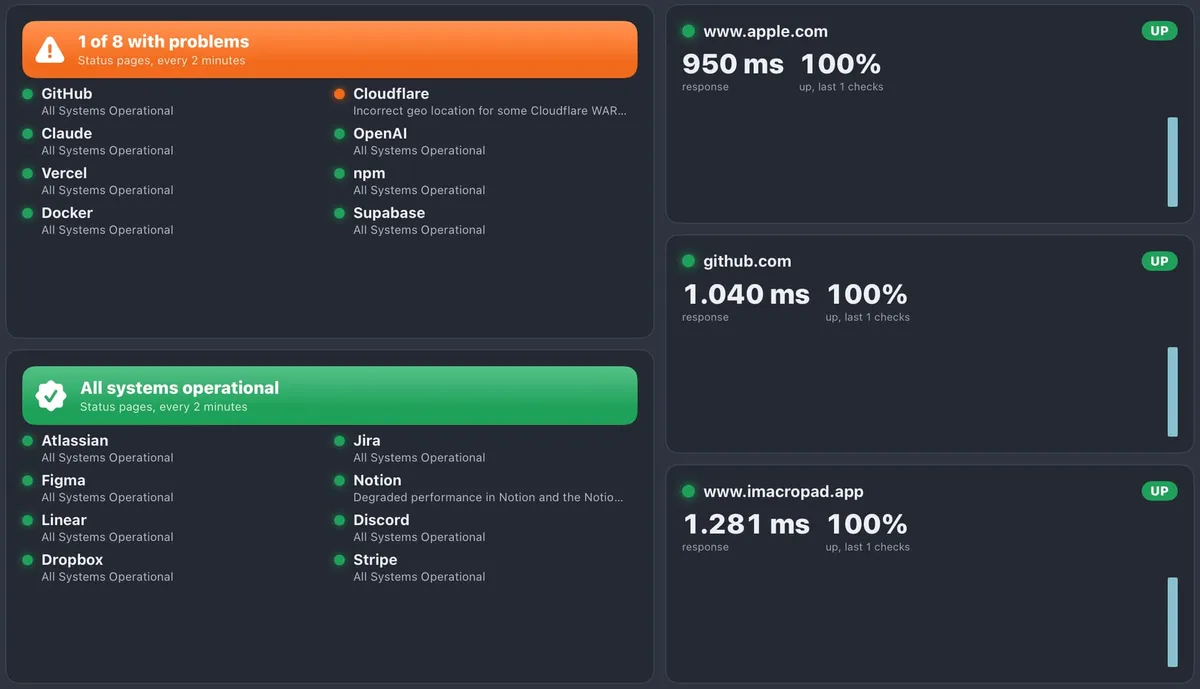 WidgetsStatus widgetsby iMacroPad communityIs it down, or is it me? The status of the services you depend on — GitHub, Cloudflare, Claude, OpenAI, Vercel, npm, Docker, Jira, Figma and more, or any status page you add — with a coloured banner when something breaks and the incident's name, plus site monitors that check an address every 30 seconds and draw its response times and uptime. A Status board layout comes with it.
⤓ 0♥ 0
WidgetsUsage statsby iMacroPad communityYour own pad in numbers, drawn like Settings ▸ Stats and in your theme's colours: today's screen time with the week as a sparkline, the last 14 days, the layouts, Mac apps and themes you use most as rings, the hours you use it and the keys you press most. For any layout or the screensaver, with two ready layouts. Counted on this iPad; nothing leaves it.
⤓ 0♥ 0
WidgetsStatus widgetsby iMacroPad communityIs it down, or is it me? The status of the services you depend on — GitHub, Cloudflare, Claude, OpenAI, Vercel, npm, Docker, Jira, Figma and more, or any status page you add — with a coloured banner when something breaks and the incident's name, plus site monitors that check an address every 30 seconds and draw its response times and uptime. A Status board layout comes with it.
⤓ 0♥ 0
WidgetsUsage statsby iMacroPad communityYour own pad in numbers, drawn like Settings ▸ Stats and in your theme's colours: today's screen time with the week as a sparkline, the last 14 days, the layouts, Mac apps and themes you use most as rings, the hours you use it and the keys you press most. For any layout or the screensaver, with two ready layouts. Counted on this iPad; nothing leaves it.
⤓ 0♥ 0Most requested
What people would like someone to make. 👍 the ones you want, or ask for your own.
Nothing requested yet. Be the first.
Request somethingBrowse everything
IntegrationAI Studioby iMacroPad communityKeys that call AI services: an image from the text on your clipboard (Gemini 2.5 Flash Image, “Nano Banana”), a short answer to it, a video through an MCP server, and one of your own Shortcuts.
⤓ 0♥ 0
WidgetsSports scoresby iMacroPad communityYour teams in their own colours: team card, match countdown, scoreboard, full league tables (Europe, the US leagues, any country), player card, tennis rankings and Formula 1. Any sport and country: search, or browse sport ▸ country ▸ league. Five looks, six layouts. Data: TheSportsDB, ESPN, Jolpica.
⤓ 0♥ 0
WidgetsStatus widgetsby iMacroPad communityIs it down, or is it me? The status of the services you depend on — GitHub, Cloudflare, Claude, OpenAI, Vercel, npm, Docker, Jira, Figma and more, or any status page you add — with a coloured banner when something breaks and the incident's name, plus site monitors that check an address every 30 seconds and draw its response times and uptime. A Status board layout comes with it.
⤓ 0♥ 0
WidgetsUsage statsby iMacroPad communityYour own pad in numbers, drawn like Settings ▸ Stats and in your theme's colours: today's screen time with the week as a sparkline, the last 14 days, the layouts, Mac apps and themes you use most as rings, the hours you use it and the keys you press most. For any layout or the screensaver, with two ready layouts. Counted on this iPad; nothing leaves it.
⤓ 0♥ 0Nothing matches.
How an item gets here
Everything in the catalog is a plugin file: data, never code. It goes through four gates in a public GitHub repository, where anyone can read every file, picture and review.
- 1Pull request
The maker adds one folder: the plugin file, a README and screenshots.
- 2Validator
The app’s own check runs on a Mac: keys, actions, permissions, hosts and HTML. An error stops it here.
- 3AI review
An assistant reads the file, the text and every screenshot against the catalog’s standards and comments for the editor.
- 4Editor
A person reads it, tries it on a real pad and approves. Then it is live here within minutes.
On your pad it goes through the same check again and asks for each permission with the maker’s reason, all switched off until you allow them.
Build with AI
An assistant can make a layout, theme or widget pack with you and check it with the app’s own validator before you share it. Two free pieces: an MCP server with the plugin format, starter files and the validator, and a skill that teaches the steps.
MCP server
Seven tools: the format reference, widgets and info panels, starter plugins, themes and layouts, the validator, and how to submit. Add it to Claude Code:
claude mcp add imacropad -- npx -y @imacropad/mcpClaude Desktop, Cursor and other MCP apps, in their MCP settings:
{ "mcpServers": { "imacropad": { "command": "npx", "args": ["-y", "@imacropad/mcp"] } } }Skill
The workflow for Claude and other assistants that read Agent Skills: design for a landscape pad, native panels before HTML, no secrets in files, validate until it passes, then the pull request. It works with or without the MCP server.
Download the skill (.zip)For Claude Code, unzip it into your skills folder:
unzip imacropad-community-skill.zip -d ~/.claude/skills/In the Claude app, upload the zip under Settings ▸ Capabilities.
They write text only: nothing is installed on your pad or Mac, and they never need your keys. What an assistant makes goes through the same four gates as everything else.